
GitHub Actions CI/CD란? 2026년 왜 더 중요해졌나
GitHub Actions는 GitHub에 내장된 CI/CD 자동화 플랫폼으로, 코드 푸시, PR 생성, 이슈 등록 등 모든 GitHub 이벤트에 반응해 자동화 워크플로우를 실행합니다. 2026년 현재 GitHub Actions는 AI 기반 코드 리뷰 자동화, 보안 취약점 자동 패치, GitHub Copilot과의 통합으로 한층 강력해졌습니다.
이 글에서는 GitHub Actions의 핵심 개념부터 2026년 실전 CI/CD 파이프라인 구축법까지 단계적으로 안내합니다.
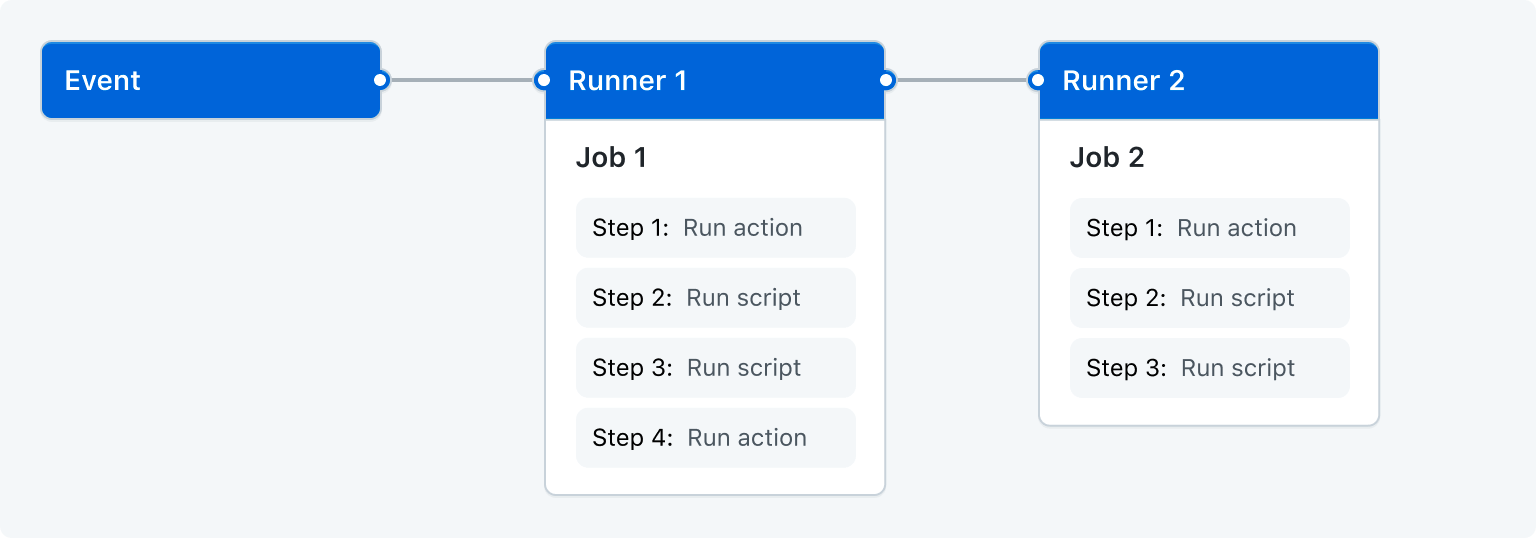
GitHub Actions 핵심 구조 이해
GitHub Actions 워크플로우는 .github/workflows/ 디렉토리에 YAML 파일로 정의합니다. 주요 개념은 다음과 같습니다:
- Workflow: 자동화된 프로세스의 전체 정의 (YAML 파일 1개 = Workflow 1개)
- Event: 워크플로우를 실행하는 트리거 (push, pull_request, schedule 등)
- Job: 하나의 가상 머신에서 실행되는 작업 단위
- Step: Job 내의 개별 명령 또는 Action
- Action: 재사용 가능한 작업 단위 (GitHub Marketplace에 15,000+ 공개)
- Runner: 워크플로우를 실행하는 서버 (GitHub 호스팅 or 자체 호스팅)

2026년 기본 CI 파이프라인 예시
# .github/workflows/ci.yml
name: CI Pipeline

on:
  push:
    branches: [main, develop]
  pull_request:
    branches: [main]

jobs:
  test:
    runs-on: ubuntu-latest
    strategy:
      matrix:
        node-version: [20, 22]
    steps:
      - uses: actions/checkout@v4

      - name: Setup Node.js ${{ matrix.node-version }}
        uses: actions/setup-node@v4
        with:
          node-version: ${{ matrix.node-version }}
          cache: 'npm'

      - name: Install dependencies
        run: npm ci

      - name: Type check
        run: npm run type-check

      - name: Lint
        run: npm run lint

      - name: Test
        run: npm test -- --coverage

      - name: Upload coverage
        uses: codecov/codecov-action@v4
        with:
          token: ${{ secrets.CODECOV_TOKEN }}
핵심 기능 1: AI 기반 코드 리뷰 자동화
2026년 GitHub Actions의 가장 주목할 만한 변화는 AI 코드 리뷰 자동화입니다. PR이 열리면 AI가 자동으로 코드를 분석하고, 버그 가능성, 보안 이슈, 개선 제안을 댓글로 달아줍니다.
# .github/workflows/ai-review.yml
name: AI Code Review

on:
  pull_request:
    types: [opened, synchronize]

jobs:
  ai-review:
    runs-on: ubuntu-latest
    permissions:
      contents: read
      pull-requests: write
    steps:
      - uses: actions/checkout@v4

      - name: AI Code Review
        uses: coderabbitai/ai-pr-reviewer@latest
        with:
          GITHUB_TOKEN: ${{ secrets.GITHUB_TOKEN }}
          OPENAI_API_KEY: ${{ secrets.OPENAI_API_KEY }}
          review_simple_changes: false
          review_comment_lgtm: false
핵심 기능 2: 보안 스캔 자동화
GitHub Advanced Security와 Actions를 연동하면 코드 푸시마다 자동 보안 스캔이 이루어집니다. 2026년에는 AI 기반 취약점 탐지가 강화되어 OWASP Top 10 취약점을 훨씬 높은 정확도로 잡아냅니다.
주요 보안 스캔 도구
- CodeQL: GitHub의 시맨틱 코드 분석 엔진, SQL Injection·XSS 등 탐지
- Dependabot: 의존성 취약점 자동 탐지 + PR 자동 생성으로 패치
- Secret Scanning: API 키, 토큰 등 시크릿이 커밋에 포함되면 즉시 경고
- Snyk: 오픈소스 의존성, IaC, 컨테이너 이미지 통합 스캔
# .github/workflows/security.yml
name: Security Scan

on:
  push:
    branches: [main]
  schedule:
    - cron: '0 2 * * 1'  # 매주 월요일 오전 2시

jobs:
  codeql:
    runs-on: ubuntu-latest
    permissions:
      security-events: write
    steps:
      - uses: actions/checkout@v4

      - name: Initialize CodeQL
        uses: github/codeql-action/init@v3
        with:
          languages: javascript, typescript

      - name: Perform CodeQL Analysis
        uses: github/codeql-action/analyze@v3

  dependency-review:
    runs-on: ubuntu-latest
    steps:
      - uses: actions/checkout@v4
      - name: Dependency Review
        uses: actions/dependency-review-action@v4
        with:
          fail-on-severity: high
핵심 기능 3: 멀티 환경 CD 파이프라인
2026년 표준 CD 전략은 dev → staging → production 다단계 배포입니다. GitHub Environments를 활용하면 각 환경마다 필수 리뷰어, 대기 시간, 환경별 시크릿을 설정할 수 있습니다.
# .github/workflows/deploy.yml
name: Deploy

on:
  push:
    branches: [main]

jobs:
  deploy-staging:
    runs-on: ubuntu-latest
    environment: staging
    steps:
      - uses: actions/checkout@v4
      - name: Deploy to Staging
        run: |
          npx vercel --token ${{ secrets.VERCEL_TOKEN }} \
            --env DATABASE_URL=${{ secrets.STAGING_DB_URL }}

  deploy-production:
    needs: deploy-staging
    runs-on: ubuntu-latest
    environment: production  # 운영 배포는 리뷰어 승인 필요
    steps:
      - uses: actions/checkout@v4
      - name: Deploy to Production
        run: |
          npx vercel --prod --token ${{ secrets.VERCEL_TOKEN }} \
            --env DATABASE_URL=${{ secrets.PROD_DB_URL }}
핵심 기능 4: Reusable Workflows로 DRY 파이프라인
여러 저장소에서 동일한 CI/CD 로직을 공유할 때 Reusable Workflows를 사용합니다. 한 곳에서 정의하고 여러 프로젝트에서 호출하는 방식으로 유지보수 비용을 크게 줄일 수 있습니다.
# .github/workflows/reusable-deploy.yml (공통 저장소)
on:
  workflow_call:
    inputs:
      environment:
        required: true
        type: string
    secrets:
      DEPLOY_TOKEN:
        required: true

jobs:
  deploy:
    runs-on: ubuntu-latest
    steps:
      - uses: actions/checkout@v4
      - name: Deploy
        run: ./deploy.sh ${{ inputs.environment }}
        env:
          TOKEN: ${{ secrets.DEPLOY_TOKEN }}

---
# 다른 프로젝트에서 호출
jobs:
  call-deploy:
    uses: my-org/.github/.github/workflows/reusable-deploy.yml@main
    with:
      environment: production
    secrets:
      DEPLOY_TOKEN: ${{ secrets.DEPLOY_TOKEN }}
실전 최적화 팁
1. 캐시로 속도 향상
- name: Cache node_modules
  uses: actions/cache@v4
  with:
    path: ~/.npm
    key: ${{ runner.os }}-node-${{ hashFiles('**/package-lock.json') }}
    restore-keys: ${{ runner.os }}-node-
2. 병렬 실행으로 시간 단축
jobs:
  lint:
    runs-on: ubuntu-latest
    steps: [...]

  test:
    runs-on: ubuntu-latest  # lint와 병렬 실행
    steps: [...]

  deploy:
    needs: [lint, test]  # 둘 다 성공 시에만 배포
    steps: [...]
3. 컨디셔널 실행으로 불필요한 실행 방지
jobs:
  deploy:
    if: github.ref == 'refs/heads/main' && github.event_name == 'push'
    # main 브랜치 push 때만 배포
GitHub Actions 비용 최적화 (2026)
GitHub Actions는 public 저장소는 무료, private 저장소는 월 2,000분(무료 플랜) 이후 과금됩니다. 비용을 줄이는 핵심 전략:
- Self-hosted Runner: 자체 서버에서 실행해 분당 과금 없이 무제한 사용
- 경로 필터: 변경된 파일 경로에 따라 관련 워크플로우만 실행
- concurrency 설정: 동일 브랜치의 중복 실행 자동 취소
- 캐싱 최대화: 의존성, 빌드 캐시를 적극 활용해 실행 시간 단축
마무리
GitHub Actions는 2026년 현재 단순 CI/CD 도구를 넘어 AI 코드 리뷰, 자동 보안 스캔, 저장소 자동화 플랫폼으로 진화했습니다. 특히 GitHub Copilot과의 통합이 강화되면서 코드 작성부터 배포, 보안까지 전체 개발 사이클을 하나의 플랫폼에서 자동화하는 것이 가능해졌습니다. 지금 바로 프로젝트에 Actions를 도입해 개발 품질과 생산성을 높여보세요.


