2016/01/19 - [unity C#] - [Unity] GUI Infinity Scroll List 무한 리스트 구현 Json
[Unity] GUI Infinity Scroll List 무한 리스트 구현 Json
어떻게 보면 간단한 구현 일 수도 있겠지만 난 어려웠다. ㅠㅠ 그래서 다시 정리하는 차원에서 포스팅 해본다. 먼저 간략하게 요약해보자면… Unity의 기본제공되는 GUI를 사용, 데이터 형태는 Json형태로 만들어..
knightk.tistory.com
이미지가 깨져서 다시 올려봅니다.
Hierarchy 구성


스크립트 구성
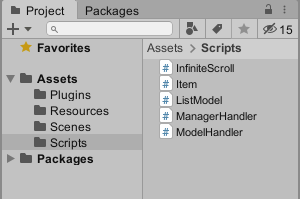
ManagerHandler.cs
using UnityEngine;

public class ManagerHandler : MonoBehaviour {
    public InfiniteScroll infiniteScroll;
    void Start () {
        Application.targetFrameRate = 60;
        initList ();
    }

    void initList () {
        infiniteScroll.ListStart ();
    }
}
ModelHandler.cs
using System.Collections;
using System.Collections.Generic;
using LitJson;
using UnityEngine;

public class ModelHandler : MonoBehaviour {
    private JsonData jsonData;
    public List<DataVO> List;
    string jsonString () {
        TextAsset t = (TextAsset) Resources.Load ("data", typeof (TextAsset));
        return t.text;
    }

    void Awake () {
        jsonData = JsonMapper.ToObject (jsonString ());
        parsing ();
    }

    void parsing () {
        for (int i = 0; i < jsonData["music"].Count; i++) {

            ListModel.Instance.dataVO.SongTitle = (string) jsonData["music"][i]["songtitle"];
            ListModel.Instance.dataVO.Singer = (string) jsonData["music"][i]["singer"];
            ListModel.Instance.dataVO.Color = hexToColor ((string) jsonData["music"][i]["color"]);
            ListModel.Instance.dataVO.Genre = (string) jsonData["music"][i]["genre"];
            ListModel.Instance.dataVO.PlayTime = float.Parse ((string) jsonData["music"][i]["playtime"]);

            ListModel.Instance.MusicList.Add (ListModel.Instance.dataVO);
        }
    }

    static Color hexToColor (string hex) {
        hex = hex.Replace ("0x", "");
        hex = hex.Replace ("#", "");
        byte a = 255;
        byte r = byte.Parse (hex.Substring (0, 2), System.Globalization.NumberStyles.HexNumber);
        byte g = byte.Parse (hex.Substring (2, 2), System.Globalization.NumberStyles.HexNumber);
        byte b = byte.Parse (hex.Substring (4, 2), System.Globalization.NumberStyles.HexNumber);
        if (hex.Length == 8) {
            a = byte.Parse (hex.Substring (6, 2), System.Globalization.NumberStyles.HexNumber);
        }
        return new Color32 (r, g, b, a);
    }
}
ListModel.cs
using System;
using System.Collections.Generic;
using UnityEngine;

[Serializable]
public struct DataVO {
    public string SongTitle;
    public string Singer;
    public Color32 Color;
    public string Genre;
    public float PlayTime;
}

public class ListModel : MonoBehaviour {
    private static ListModel _instance = null;
    public DataVO dataVO;
    public List<DataVO> MusicList = new List<DataVO> ();
    public static ListModel Instance {
        get {
            if (_instance == null) {
                _instance = (GameObject.Find ("Manager")).AddComponent<ListModel> ();
            }
            return _instance;
        }
    }

}
InfiniteScroll.cs
using System.Collections.Generic;
using UnityEngine;
using UnityEngine.UI;

public class InfiniteScroll : MonoBehaviour {
    [SerializeField]
    private RectTransform m_ItemBase;
    [SerializeField]
    int m_instantiateItemCount = 9;
    [SerializeField]
    float m_itemWidth = 1080;
    [SerializeField]
    float m_itemHeight = 200;
    [SerializeField]
    float gap = 10;
    public Direction direction;
    [System.NonSerialized]
    public List<RectTransform> m_itemList = new List<RectTransform> ();
    protected float m_diffPreFramePosition = 0;
    [SerializeField]
    private int m_currentItemNo = 0;
    public ScrollRect scrollRect;
    public List<DataVO> listData;
    public enum Direction {
        Vertical,
        Horizontal,
    }

    // cache component
    public RectTransform m_Content;

    private float AnchoredPosition {
        get {
            return (direction == Direction.Vertical) ?
                -m_Content.anchoredPosition.y :
                m_Content.anchoredPosition.x;
        }
    }
    private float ItemScale {
        get {
            return (direction == Direction.Vertical) ?
                m_itemHeight :
                m_itemWidth;
        }
    }

    void Start () {
        m_itemWidth = Screen.width;
        m_itemHeight = Screen.height / 12;
    }

    public void ListStart () {
        listData = ListModel.Instance.MusicList;

        if (listData.Count < m_instantiateItemCount) {
            m_instantiateItemCount = listData.Count;
        } else {
            m_instantiateItemCount = (direction == Direction.Vertical) ?
                Mathf.RoundToInt (Screen.height / ItemScale) + 3 :
                Mathf.RoundToInt (Screen.width / ItemScale) + 3;
        }

        // create items
        scrollRect.horizontal = direction == Direction.Horizontal;
        scrollRect.vertical = direction == Direction.Vertical;

        if (direction == Direction.Vertical) {
            m_Content.SetSizeWithCurrentAnchors (RectTransform.Axis.Vertical, (ItemScale + gap) * (listData.Count - 1) + gap);
            m_Content.SetSizeWithCurrentAnchors (RectTransform.Axis.Horizontal, m_itemWidth + gap * 2);
        } else {
            m_Content.SetSizeWithCurrentAnchors (RectTransform.Axis.Horizontal, (ItemScale + gap) * (listData.Count - 1) + gap);
            m_Content.SetSizeWithCurrentAnchors (RectTransform.Axis.Vertical, m_itemHeight + gap * 2);
        }

        scrollRect.onValueChanged.AddListener (valueChange);
        Debug.Log (listData.Count);
        m_ItemBase.gameObject.SetActive (false);
        for (int i = 0; i < m_instantiateItemCount; i++) {
            var item = GameObject.Instantiate (m_ItemBase) as RectTransform;
            item.SetParent (transform, false);
            item.name = i.ToString ();

            if (direction == Direction.Vertical) {
                item.SetSizeWithCurrentAnchors (RectTransform.Axis.Horizontal, m_itemWidth - gap * 2);
                item.SetSizeWithCurrentAnchors (RectTransform.Axis.Vertical, m_itemHeight);
            } else {
                item.SetSizeWithCurrentAnchors (RectTransform.Axis.Horizontal, m_itemWidth);
                item.SetSizeWithCurrentAnchors (RectTransform.Axis.Vertical, m_itemHeight);
            }

            item.anchoredPosition =
                (direction == Direction.Vertical) ?
                new Vector2 (gap, -gap - (ItemScale + gap) * i) :
                new Vector2 ((ItemScale + gap) * i + gap, -gap);
            m_itemList.Add (item);

            item.gameObject.SetActive (true);
            item.GetComponent<Item> ().UpdateItem (i);
        }
    }

    private void valueChange (Vector2 _pos) {
        // scroll up, item attach bottom  or  right
        while (AnchoredPosition - m_diffPreFramePosition < -(ItemScale + gap) * 2) {
            m_diffPreFramePosition -= (ItemScale + gap);

            var item = m_itemList[0];
            m_itemList.RemoveAt (0);
            m_itemList.Add (item);

            var pos = (ItemScale + gap) * m_instantiateItemCount + (ItemScale + gap) * m_currentItemNo;
            item.anchoredPosition = (direction == Direction.Vertical) ? new Vector2 (gap, -pos - gap) : new Vector2 (pos + gap, -gap);

            m_currentItemNo++;

            if (m_currentItemNo + m_instantiateItemCount < listData.Count) {
                item.GetComponent<Item> ().UpdateItem (m_currentItemNo + m_instantiateItemCount);
            } else {
                item.GetComponent<Item> ().UpdateItem (-100);
            }
        }

        // scroll down, item attach top  or  left
        while (AnchoredPosition - m_diffPreFramePosition > 0) {
            m_diffPreFramePosition += (ItemScale + gap);

            var itemListLastCount = m_instantiateItemCount - 1;
            var item = m_itemList[itemListLastCount];
            m_itemList.RemoveAt (itemListLastCount);
            m_itemList.Insert (0, item);

            m_currentItemNo--;

            var pos = (ItemScale + gap) * m_currentItemNo + gap;
            item.anchoredPosition = (direction == Direction.Vertical) ? new Vector2 (gap, -pos) : new Vector2 (pos, -gap);

            if (m_currentItemNo > -1) {
                item.GetComponent<Item> ().UpdateItem (m_currentItemNo);
            } else {
                item.GetComponent<Item> ().UpdateItem (-100);
            }
        }
    }
}
Item.cs
using UnityEngine;
using UnityEngine.UI;

public class Item : MonoBehaviour {
    public Text m_Text;
    public Image m_Image;
    public void UpdateItem (int count) {
        if (count == -100) {
            m_Text.gameObject.SetActive (false);
            m_Image.gameObject.SetActive (false);
        } else {
            m_Text.gameObject.SetActive (true);
            m_Image.gameObject.SetActive (true);
            m_Text.text = count + 1 + " - " + Screen.width + " x " + Screen.height;
            m_Image.color = ListModel.Instance.MusicList[count].Color;
        }
    }
}
Manager 오브젝트에 ManagerHandler.cs / ModelHandler.cs / ListModel.cs 붙여줍니다.

ScrollView를 만들어 다음과같이 세팅해줍니다.
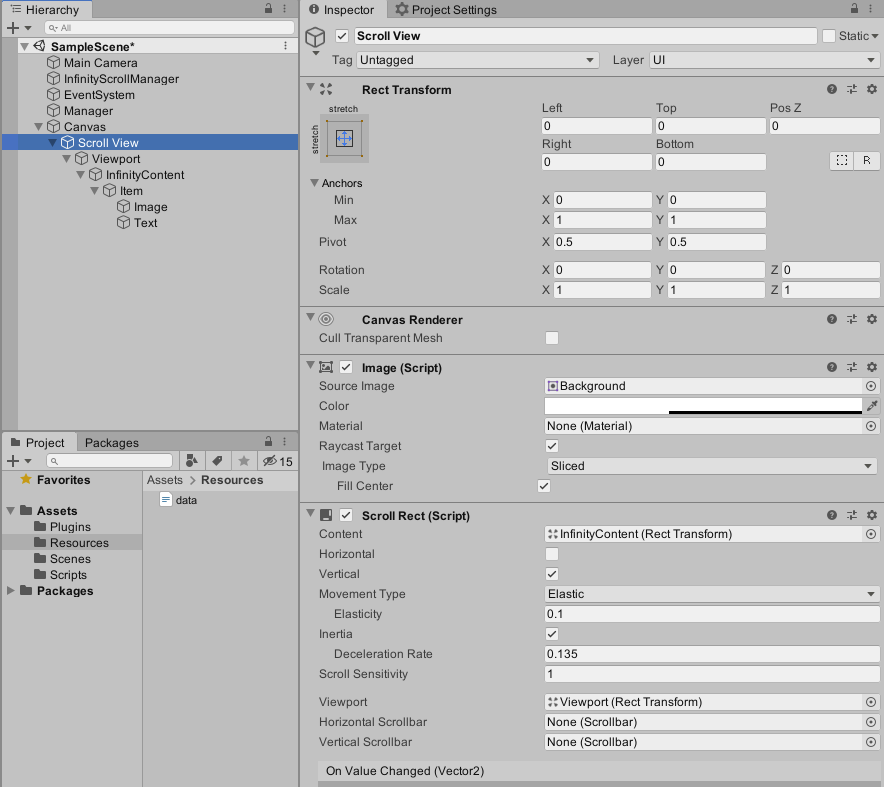
InfinityContent 오브젝트에 InfinityScroll.cs 를 붙여주고
ScrollRect항목에 위에서 설정한 ScrollRect를 드래그앤 드랍으로 넣어줍니다.
Content항목에 InfinityContent오브젝트를 끌어넣어 연결해줍니다.

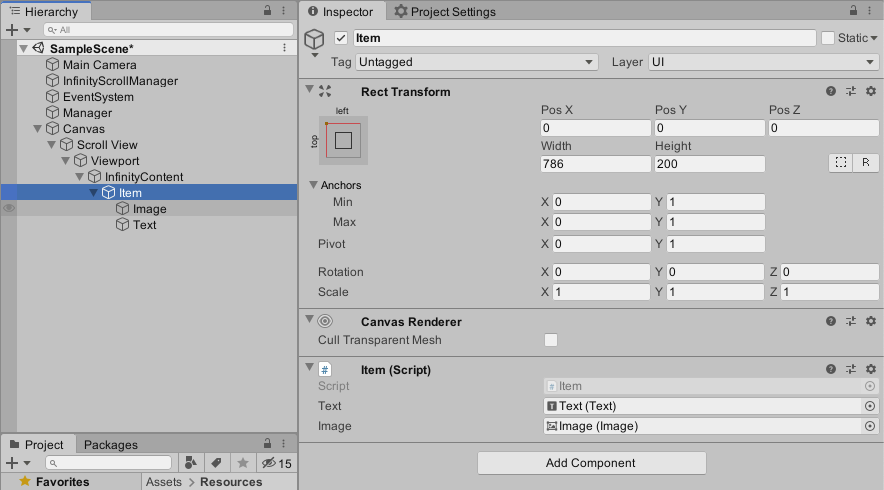
Item 오브젝트에 Item.cs를 붙여주고 위에 InfinityScroll 인스펙터에 ItemBase에 드래그앤 드랍으로 넣어줍니다.
Item인스펙터의 Text와 Image를 해당 오브젝트로 연결시켜줍니다.
data.txt 파일 생성
Resources폴더에 data.txt파일만들어 아래와 같이 데이터를 넣어줍니다. 아래 데이터는 테스트 하기 위해 임의로 생성한 것이고 자신의 리스트에 맞게 수정해서 사용하면 됩니다.
{
  "music":[
    {
      "songtitle" : "Love Will Show You Everything",
      "singer" : "Various Artists",
      "color" : "f98181",
      "genre" : "rock",
      "playtime" : "0"
    },
    {
      "songtitle" : "Love Will Show You Everything",
      "singer" : "Various Artists",
      "color" : "f981bc",
      "genre" : "rock",
      "playtime" : "0"
    },
    {
      "songtitle" : "Love Will Show You Everything",
      "singer" : "Various Artists",
      "color" : "f881f9",
      "genre" : "rock",
      "playtime" : "0"
    },
    {
      "songtitle" : "Love Will Show You Everything",
      "singer" : "Various Artists",
      "color" : "d081f9",
      "genre" : "rock",
      "playtime" : "0"
    },
    {
      "songtitle" : "Love Will Show You Everything",
      "singer" : "Various Artists",
      "color" : "ab81f9",
      "genre" : "rock",
      "playtime" : "0"
    },
    {
      "songtitle" : "Love Will Show You Everything",
      "singer" : "Various Artists",
      "color" : "8c81f9",
      "genre" : "rock",
      "playtime" : "0"
    },
    {
      "songtitle" : "Love Will Show You Everything",
      "singer" : "Various Artists",
      "color" : "8192f9",
      "genre" : "rock",
      "playtime" : "0"
    },
    {
      "songtitle" : "Love Will Show You Everything",
      "singer" : "Various Artists",
      "color" : "81a8f9",
      "genre" : "rock",
      "playtime" : "0"
    },
    {
      "songtitle" : "Love Will Show You Everything",
      "singer" : "Various Artists",
      "color" : "81c8f9",
      "genre" : "rock",
      "playtime" : "0"
    },
    {
      "songtitle" : "Love Will Show You Everything",
      "singer" : "Various Artists",
      "color" : "81e4f9",
      "genre" : "rock",
      "playtime" : "0"
    },
    {
      "songtitle" : "Love Will Show You Everything",
      "singer" : "Various Artists",
      "color" : "81f9e4",
      "genre" : "rock",
      "playtime" : "0"
    },
    {
      "songtitle" : "Love Will Show You Everything",
      "singer" : "Various Artists",
      "color" : "81f9c5",
      "genre" : "rock",
      "playtime" : "0"
    },
    {
      "songtitle" : "Love Will Show You Everything",
      "singer" : "Various Artists",
      "color" : "81f9a3",
      "genre" : "rock",
      "playtime" : "0"
    },
    {
      "songtitle" : "Love Will Show You Everything",
      "singer" : "Various Artists",
      "color" : "81f989",
      "genre" : "rock",
      "playtime" : "0"
    },
    {
      "songtitle" : "Love Will Show You Everything",
      "singer" : "Various Artists",
      "color" : "a0f981",
      "genre" : "rock",
      "playtime" : "0"
    },
    {
      "songtitle" : "Love Will Show You Everything",
      "singer" : "Various Artists",
      "color" : "c2f981",
      "genre" : "rock",
      "playtime" : "0"
    },
    {
      "songtitle" : "Love Will Show You Everything",
      "singer" : "Various Artists",
      "color" : "e9f981",
      "genre" : "rock",
      "playtime" : "0"
    },
    {
      "songtitle" : "Love Will Show You Everything",
      "singer" : "Various Artists",
      "color" : "f9e981",
      "genre" : "rock",
      "playtime" : "0"
    },
    {
      "songtitle" : "Love Will Show You Everything",
      "singer" : "Various Artists",
      "color" : "f9cd81",
      "genre" : "rock",
      "playtime" : "0"
    },
    {
      "songtitle" : "Love Will Show You Everything",
      "singer" : "Various Artists",
      "color" : "f9b181",
      "genre" : "rock",
      "playtime" : "0"
    },
    {
      "songtitle" : "Love Will Show You Everything",
      "singer" : "Various Artists",
      "color" : "f99781",
      "genre" : "rock",
      "playtime" : "0"
    }
  ]
}
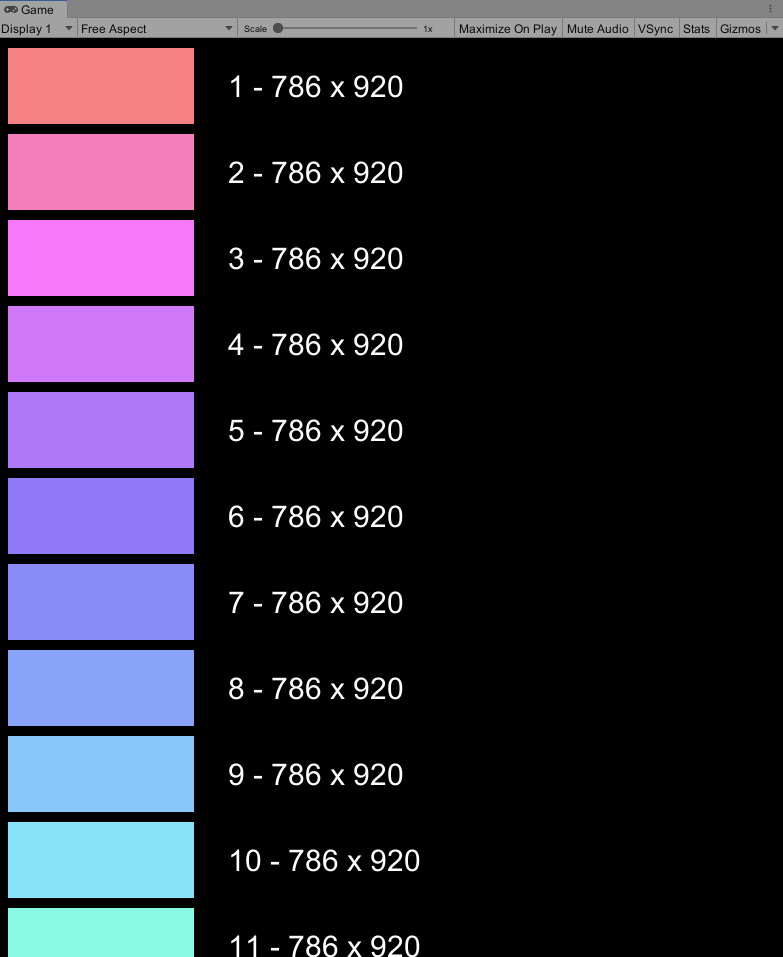
실행화면
'unity C#' 카테고리의 다른 글
| [Unity] Animation Curve DOTween 커스터마이징 (0) | 2020.06.29 |
|---|---|
| [Unity] 유니티에서 홀로렌즈2 빌드하기 (4) | 2020.06.29 |
| [Unity] 안드로이드와 아두이노 블루투스 연결 (7) | 2019.06.20 |
| [Unity] 로컬파일 불러오기(안드로이드, mac, pc) (0) | 2019.06.18 |
| [Unity] UI Sprite Image 가장자리 Antialiasing 설정 (0) | 2019.06.03 |


